
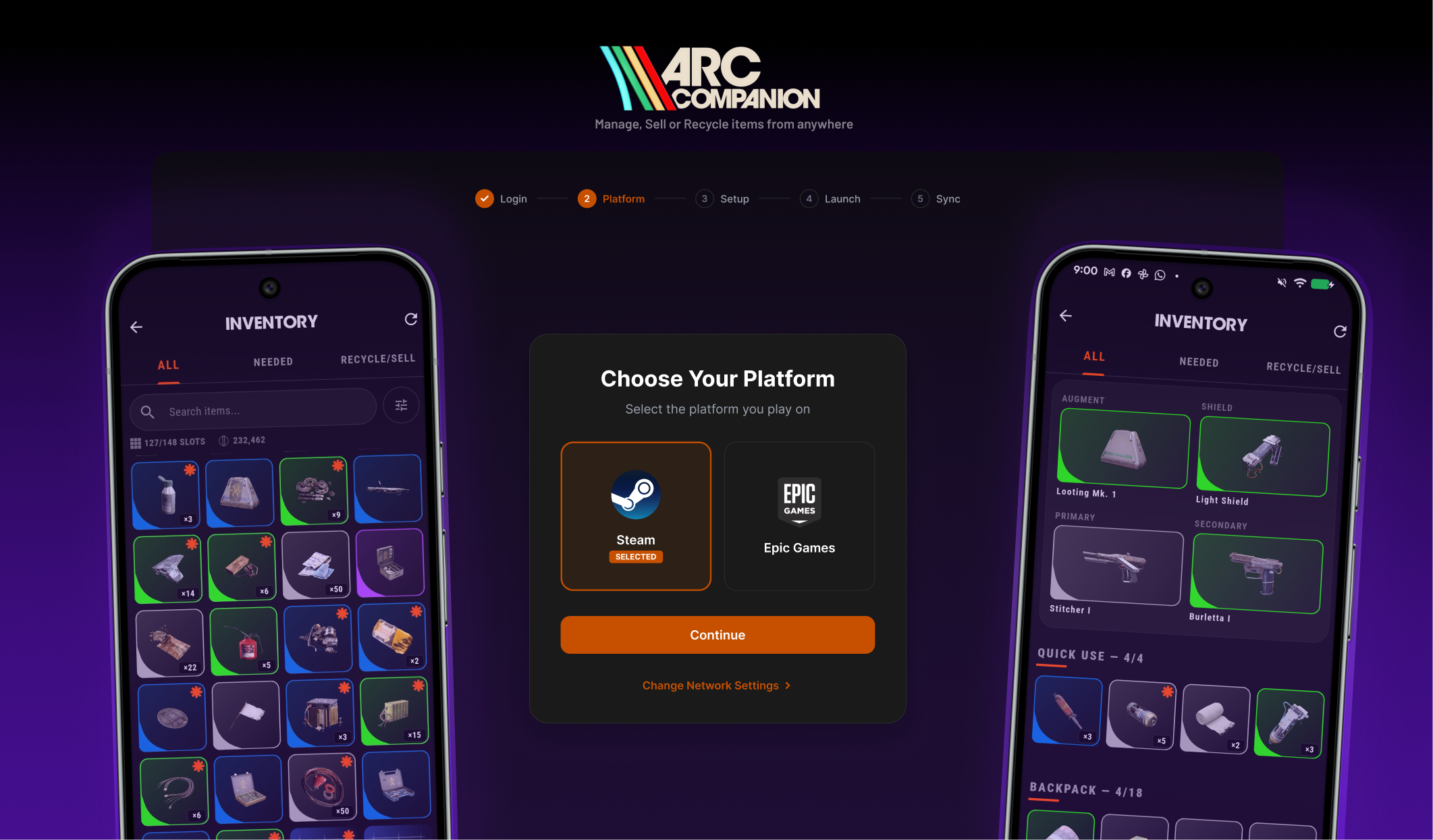
Mirror your stash. Win more raids.
The optional Windows companion that mirrors your live stash, currencies and progression into the Arc Companion mobile app — without you ever typing a password.
Downloads as a .zip. Unzip, then if Windows shows SmartScreen, click More info → Run anyway.
- Latest version
- Download size
- Pair time
- Passwords stored
Built for raids you
actually want to win
The bridge between the game and the mobile companion. Install once and every tool — maps, items, quests, marketplace — knows what you already own.
Feature
Live stash mirror
Every item, currency and blueprint from your in-game stash — across containers and loadouts — on your phone in seconds.
Feature
Smarter planning
Know what you own before you queue. Plan crafts, quest pre-reqs and trades without ever alt-tabbing.
Feature
One-tap re-sync
Tap Sync Now on desktop or phone and your snapshot updates in seconds. No re-pair, no QR, no friction.
Feature
No password, ever
Pair with a single QR scan from the mobile app. Your platform credentials never touch the tool.
A small tool with a small surface.
Arc Companion Sync does one thing — capture a short-lived game session token so your phone can read your stash — and it tries hard to do that without putting anything sensitive at risk.
No password prompts. No screenshots. No background telemetry. Tokens live in your OS's credential manager; tap Disconnect on mobile and the server-side mirror is gone too.
Our promise
We will never read, modify, or inject anything into the game client. If you ever spot otherwise — open an issue, we'll fix it the same day.
We never see your password
Sync captures only the short-lived session token the game already uses. Your platform credentials never touch the tool, our servers, or your network.
Device-scoped tokens
Tokens are encrypted in your OS credential manager and bound to the device you approved from the phone. Disconnect on mobile and they're wiped server-side too.
Signed, verified builds
Every release is code-signed and ships with a SHA-256 hash you can verify before installing. The same EXE you downloaded is the same EXE that runs — no swap, no tamper.
Trivial to remove
Self-contained EXE — no installer, no services, no registry leftovers. Quit it, delete it, and it's gone.
Four steps from
download to live stash
Step 01
Run as administrator
Right-click the EXE and pick Run as administrator. That one prompt is all Sync ever needs to capture the in-game session.
Step 02
Scan from mobile
Open Arc Companion → Connect Embark Account → scan the QR shown in the desktop wizard. Pairing takes a few seconds.
Step 03
Choose platform
Pick Steam or Epic so Sync knows which session to mirror. Switch any time from the wizard's sidebar.
Step 04
Sync & ready to go
Your stash, currencies and progression light up on your phone in seconds — and stay in sync on every Sync Now tap.
Questions, answered
Everything else worth knowing before you install.
No. The mobile app works fully without it — maps, item database, marketplace, quests, blueprints, all free. Sync is optional and only needed if you want your real in-game stash and currencies mirrored into the app.
Sync does not modify the game, read its memory, hook into it, or send any inputs. It only captures the same network token the game already uses to talk to Embark's official APIs — the same way any companion-style tool works. There is no automation, no aimbot, no advantage in raids.
When you launch the game through the wizard, Windows hands the game a TLS keylog file (a standard, opt-in feature). Sync uses that file to decrypt the game's normal traffic to the Embark API, pulls the short-lived bearer token, encrypts it, and uploads it to your Arc Companion account so the mobile app can read your stash. Once captured, the keylog file is wiped.
The captured access token (not your password) is stored in Windows Credential Manager on your PC, and mirrored to your Arc Companion Supabase row so the mobile app can read it. Tap Disconnect on the More tab in the mobile app and both copies are deleted.
Embark's game tokens are short-lived (~24h with no refresh path). When it expires, just open the wizard, hit Sync Now, and you're back in a few seconds. The wizard remembers your device so you usually skip the QR step on repeat syncs.
The launcher-environment injection that enables session capture (SSLKEYLOGFILE) requires admin on most Windows setups. The tool tells you about this up front and refuses to run elevated commands you didn't approve.
Not today. The capture flow relies on Windows-specific launcher behavior. macOS / Linux are on the roadmap if there's enough demand — let us know via the in-app contact form.
Every signed release ships with a SHA-256 hash on the release notes page. Run `Get-FileHash Arc-Companion-Sync.exe` in PowerShell and compare — if it matches, the EXE you downloaded is the one we published.
Quit the tool and delete the EXE — that's it. There's no installer, no services, no registry entries. To also wipe your linked account, open the mobile app → More → Disconnect Embark.
Yes. When a newer signed release is published, the wizard offers to update itself on next launch. You can decline and keep your current version.
Download now. Drop in tonight.
v0.3.0 · Arc-Companion-Sync.zip · Windows 10 / 11 · ~10 MB · Free